From feature to platform: lessons from scaling server-driven UI
Amanda Correa, Senior Engineer, Mobile Platform · October 6, 2026
•8 min readServer-driven UI sounds simple: you send the client a description of what to render and let the app take care of the rest. The hard part is designing a system that dozens of other engineers can safely contribute to without turning the platform into a distributed junk drawer.
There are plenty of available resources about how server-driven UI works. This one is about what happens once it works and every team wants to use it.
A platform isn't really a platform when the team that owns it is the only one who can safely change it.
Where we started
Building mobile UI is expensive because every behavior and presentation change is tied to an app release. As Hinge Health grows, we need to move at the speed our members need care. Every one of our members deserves a personalized, dynamic, and engaging experience, and SDUI lets us tailor that experience to each member and their program without waiting on an app release.
Configurable Layout, our SDUI system, was first built for our Home and exercise screens. By the time our platform team took it on, it had a solid foundation: about two dozen components, simple navigation, and a full feature running end to end in production.
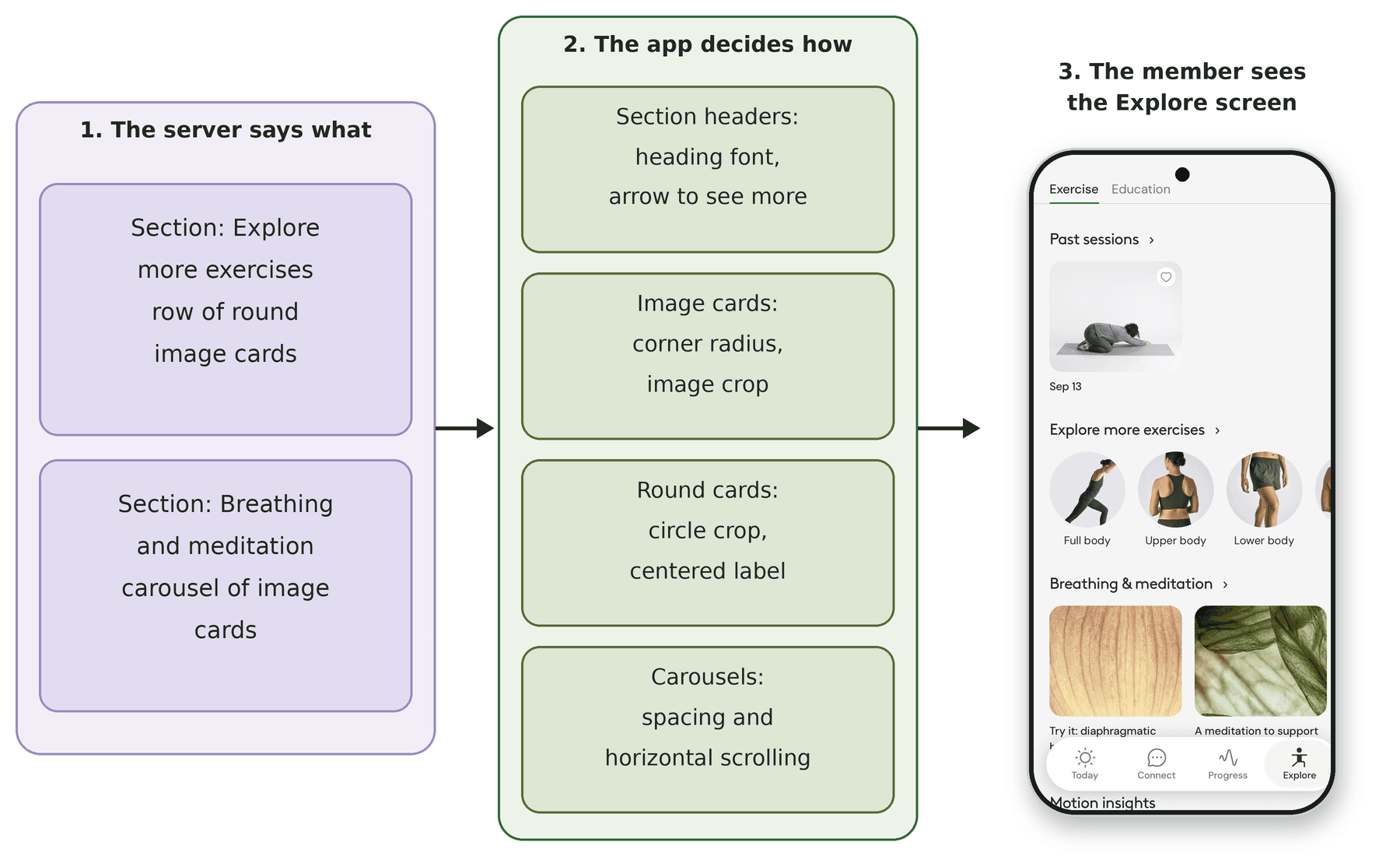
Our Explore screen, built entirely with Configurable Layout. The server describes each section and its cards, and the app decides how they look.
It also had some growing pains. Engineers outside the original team had a hard time finding out which components existed. Contributing meant learning the whole system first. Ownership wasn't clearly defined, so every change went through the same few people. And components were built one screen at a time, so the next team that needed a card often built their own.
So our mobile platform team set a goal to make Configurable Layout something any team could safely build on, without needing us for every change.
One contract, many contributors
Here's the whole system in one picture:

The contract in the middle is the key to scaling, so that's where we split ownership. The platform team owns the contract itself: the schema, the server code that runs each screen's mappers (the pieces that turn feature data into a layout), the lists of supported components on both sides, the tooling, and the monitoring.
Product teams own their screens' layouts and the server logic behind them. Today eight product teams own their own folders in the layout code and ship changes to their screens without waiting on us. When a team needs something new in the shared contract, like a new component or a new screen, they build it and we review it. That review loop is intentional. Every team depends on the contract, so one team keeps it consistent, and the tooling below keeps that review quick.
Making components easy to find
To help teams find what already exists, we built a component catalog into our internal test builds. Anyone at Hinge Health with a test device can browse nearly every component we support, rendered through the same path production uses. For some components, engineers can even live-edit properties right on the device and watch them change. Pre-commit and CI checks require every registered component to ship a representative sample, so the catalog stays up to date as components are added.
Making it easy to contribute
We treat documentation and tooling as part of the platform.
Both the app and the server have their own guide, kept next to the code. Those same guides are written for AI coding agents, so an engineer can ask their agent to add a component, and the starting point already follows our rules. The engineer still reviews it, tests it, and owns the change.
We also built AI skills that handle the repetitive setup. One generates a new server-side component with its schema and tests, and another creates a new screen. A third registers the matching native component and wires its styling to our design tokens, so nobody hardcodes a color or a font size. Every pull request that touches Configurable Layout also gets an automated check against our registration rules, with inline feedback for the author. A person on our team still reviews and approves every change. Because the basic checks are already done, we can spend that review on the design.
Flexibility through partnership
For a long time, the lack of flexibility was the main reason teams chose not to use Configurable Layout. If a design didn't match one of our existing components, or the platform didn't support what a team was building, they found their own solution outside Configurable Layout. Partnering with our design system team changed that. Together we added building blocks that map to the design system, like stacks, rows, text, and buttons. With those in place, and with product teams adding components of their own, the catalog grew from about two dozen components to more than 110.
These building blocks describe what the layout should do. The server says "stack these vertically," and the app decides how that looks using our design tokens. When the design system evolves, only the app-side mapping changes and the server contract stays the same.
Failing gracefully
When it comes to handling failures in SDUI, the goal is to fail gracefully. A problem in one part of a layout shouldn't turn into a broken screen for a member.
On the server, layouts are built by mappers, and each one runs on its own. If a mapper fails, we log it and skip it instead of failing the whole request. The server also knows which components each app version can render, and it leaves out anything the app doesn't support, which protects members on older app versions. On the device, every component's data is validated before it renders. If the data is bad, we report it and skip that component instead of showing something broken.
Mapper failures and bad component data are both logged, and errors building a layout trigger alerts for our team.
Where we are now
Configurable Layout now powers 24 screens, up from 13. One screen can show different content depending on the member and their program, so we also count every screen and content combination we serve from the server. We call each of those a product surface. We started with about 94, and over the last six months we served 120.
Every one of those surfaces can change without an app release. Along the way, teams also added new kinds of components and workflows that the next team can reuse. One product team built a forms system on the platform, and another team picked it up and extended it for their own flows instead of starting from scratch.
What we learned
Building SDUI is an architecture problem. Scaling SDUI is an organizational and contract-design problem.
If you're scaling an SDUI platform of your own, here's what worked for us. Keep the shared contract with one team, and give the teams that own each feature everything else. Make the right way the easiest way. A catalog, guides next to the code, and automated review help teams catch problems before a person ever reviews the change. And let the server describe what a layout should do while the app decides how it looks.
SDUI gave us a way to separate the description of an experience from its native implementation. But the bigger lesson has been that the architecture around that boundary matters just as much as the rendering technology itself. If you're considering SDUI, start by defining what you want to move to the server and, just as importantly, what you don't.
For all the tooling and automation in this post, the best part of this work has been the people. As teams got comfortable with the platform, they started bringing their own ideas and contributions back to it, and those contributions are a big reason Configurable Layout keeps scaling. If you enjoy building platforms together with other teams, come build with us.